One of the standout presentations at FlutterCon Europe 2024 focused on Flutter Fragment Shaders—a powerful tool that opens up exciting possibilities for Flutter developers. The session shed light on how developers can push the boundaries of creativity using this technique, which has its roots in game development.

What Is FlutterCon?
FlutterCon is a multi-day conference dedicated to exploring Flutter, the popular cross-platform development framework. The conference dives deep into technical topics, covering not only Flutter itself but also the native integrations it relies on. This year’s event included sessions packed with practical insights, innovative demos, and detailed explanations—none more intriguing than the one about Fragment Shaders.
What Are Fragment Shaders?
A Fragment Shader in Flutter is essentially a program that runs on the GPU (Graphics Processing Unit) and manipulates the color of individual pixels on the screen. This parallel processing capability makes Fragment Shaders ideal for creating stunning visual effects like lighting, shadows, and color gradients.
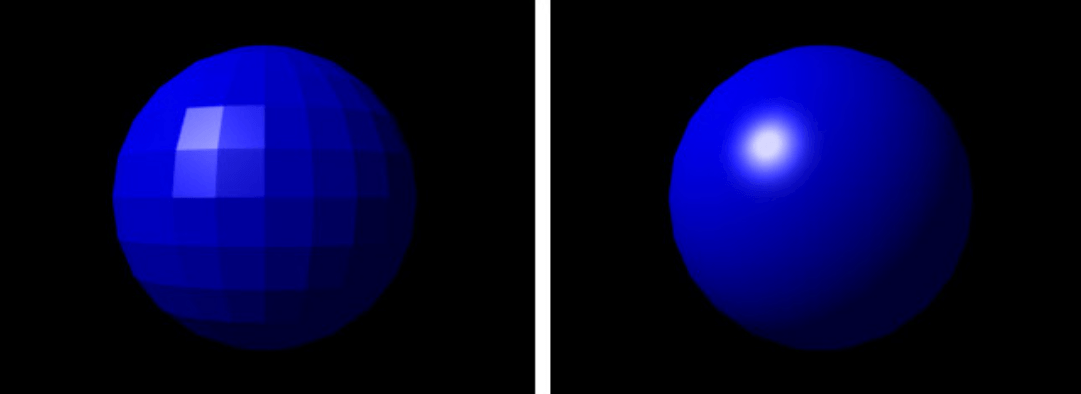
Originating in game development, shaders calculate lighting effects for 3D scenes. Developers in earlier days often used them as a workaround for hardware limitations, producing approximate results that became essential for rendering complex visuals.
Why Use Fragment Shaders in Flutter?
With the release of Flutter 3.7, Fragment Shaders gained greater prominence in Flutter’s ecosystem. While shaders have been used implicitly for features like gradients and blurs, Flutter now provides developers direct access to leverage them for more customized effects.
If you’re familiar with Flutter’s CustomPaint widget, you’re already halfway there. Fragment Shaders behave in a similar manner but provide a more granular level of control over pixel manipulation, unlocking new possibilities for creating immersive animations and interfaces.
The GPU Advantage
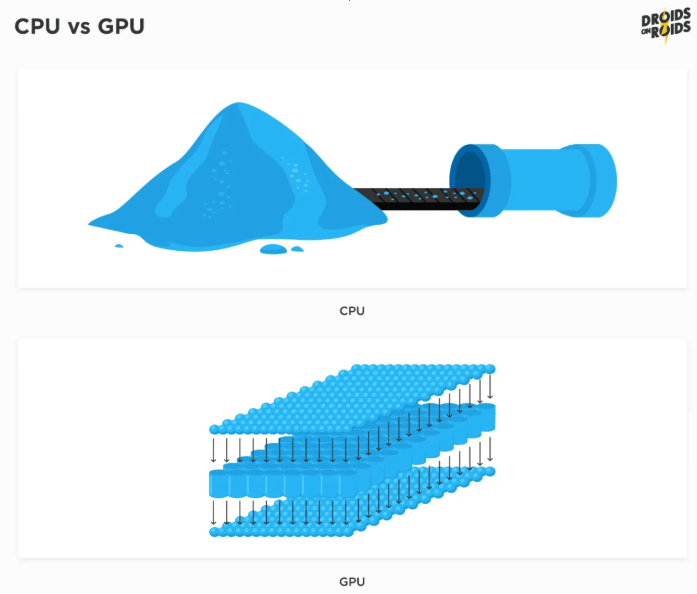
While Flutter code traditionally runs on the CPU, this approach has its limitations. CPUs are not designed to execute large volumes of operations simultaneously. Enter the GPU, which specializes in parallel processing. Using a shader language like GLSL (OpenGL Shading Language), we can bridge the gap between Dart and the GPU, enabling high-performance rendering.
GLSL, a C-like programming language, is specifically designed for shaders. Although you won’t be writing “Hello, World!” programs in GLSL, you can start with simple examples, such as changing pixel colors, to understand its syntax and workflow.
Implementing Fragment Shaders in Flutter
Here’s a quick breakdown of how to integrate Fragment Shaders into a Flutter project:
1. Add Dependencies
Start by adding the flutter_shaders package to your pubspec.yaml file. Also, create a dedicated folder for your shaders. In our experience, it is best to do this outside your assets folder, for better organization.
2. Use the ShaderBuilder Widget
The ShaderBuilder widget from the flutter_shaders package simplifies the process of loading and implementing your shader code. It provides a builder that returns a usable shader for rendering.
3. Integrate with a Custom Painter Widget
Pass the FragmentShader to a CustomPainter widget, which will use it to draw graphics on the canvas. For example, you can use the shader to fill a rectangle that spans the entire screen, showcasing dynamic visuals.
Challenges and Real-World Applications
While implementing shaders from scratch is rewarding, using pre-built shaders available online is a faster way to get started. Here are some practical use cases:
- Interactive Demos: The monster555/flutter_interactive_shader_demo repository demonstrates how shaders can create engaging, interactive effects.
- Weather Applications: Shaders can simulate realistic weather conditions, as seen in monster555/flutter_shady_weather_demo.
- Banking and Music Apps: Enhance user interfaces with subtle shader effects like button animations or audio visualizations.
Check out demos from FlutterCon here.
Conclusion
The presentation at FlutterCon 2024 highlighted the untapped potential of Fragment Shaders for developers who want to create visually stunning applications. Whether it’s crafting mesmerizing animations or optimizing UI performance, shaders add a new dimension to Flutter development.
By combining Dart with the power of GLSL, developers can bridge the gap between CPU and GPU, delivering rich, engaging user experiences. Flutter’s growing support for advanced graphics makes it an exciting choice for app development in 2024 and beyond.
Dive into the world of shaders and transform your Flutter apps into visual masterpieces!